 DIMENSI
ClickUp Brain: Minit dan E-mel Siap Lebih Pantas, Tetapi Semak Dahulu Sebelum Hantar
Bos minta minit mesyuarat, laporan ringkas dan e-mel susulan sebelum petang. Nota mesyuarat pula bertaburan di beberapa tempat.
Ramai orang salin nota itu, kemudian taip semula semuanya dari awal. Kerja ini penat dan lambat. Perkara penting juga mudah tertinggal, terutama tindakan susulan yang perlu diambil oleh rakan sepasukan.
ClickUp Brain ialah pembantu AI (kecerdasan buatan) dalam ClickUp yang boleh membantu anda menulis draf e-mel, menyemak bahasa dan menyunting dokumen. Dalam artikel ini, kami terangkan apa fungsinya, berapa harganya, cara bermula dan perkara yang anda perlu jaga.
Apa fungsinya
ClickUp ialah aplikasi pengurusan kerja, dan ClickUp Brain ialah pembantu AI yang terbina di dalamnya. Laman rasmi ClickUp menyenaraikan beberapa kemahiran Brain, antaranya “Write copy” (menulis teks), “Draft emails” (mendraf e-mel), “Create briefs” (menyediakan ringkasan tugasan), “Proofread content” (menyemak ejaan dan bahasa) dan “Revise documents” (menyunting dokumen).
Brain juga boleh “Build decks”, iaitu membina dek slaid. Selain dek, ia boleh membina artifak (hasil kerja siap) seperti papan pemuka (dashboard) atau penjejak (tracker) berdasarkan penerangan yang anda taip.
Bagi pekerja pejabat, maksudnya mudah. Anda tampal nota, kemudian minta Brain menyusunnya menjadi minit, ringkasan atau draf e-mel. Anda tidak perlu bermula dengan halaman kosong.
Ciri utama
- Panggil dengan @Brain: Brain boleh dipanggil di mana-mana dalam ClickUp dengan menaip @Brain.
- Bantuan menulis: Menulis teks, mendraf e-mel, menyediakan ringkasan, menyemak bahasa dan menyunting dokumen.
- Bina dek dan artifak: Membina dek slaid, papan pemuka atau penjejak daripada penerangan.
- Deep Search: Carian mendalam merentas ruang kerja, aplikasi yang disambungkan dan web.
- Pilihan model AI: Anda boleh memilih model seperti Claude, GPT dan Gemini.
- AI Notetaker: Pengambil nota mesyuarat automatik. Ciri ini disenaraikan pada pelan Max, bukan pelan percuma.
Harga
Laman harga ClickUp memaparkan harga dengan simbol $ sahaja, dan hanya untuk bil tahunan:
- Free Forever: $0. Tiada kad kredit diperlukan. Termasuk percubaan ClickUp Brain sebanyak 500 kredit bagi setiap ruang kerja, dan panggilan MCP (Model Context Protocol, cara alat AI lain bersambung dengan ClickUp) dihadkan 100 kali sehari.
- Core: $9 seorang sebulan, dibilkan tahunan.
- Business: $17 seorang sebulan, dibilkan tahunan.
- Max: $100 seorang sebulan, dibilkan tahunan.
- Enterprise: Harga khas. Hubungi pasukan jualan.
- Kredit tambahan: $10 bagi 10K (10,000) kredit.
Harga untuk bil bulanan tidak dipaparkan dalam maklumat yang kami semak. Satu direktori alat AI pihak ketiga menyebut harga bermula $7 sebulan, tetapi kami mengikut laman rasmi.
Harga disemak pada 11 November 2026 dan mungkin berubah.
Cara bermula
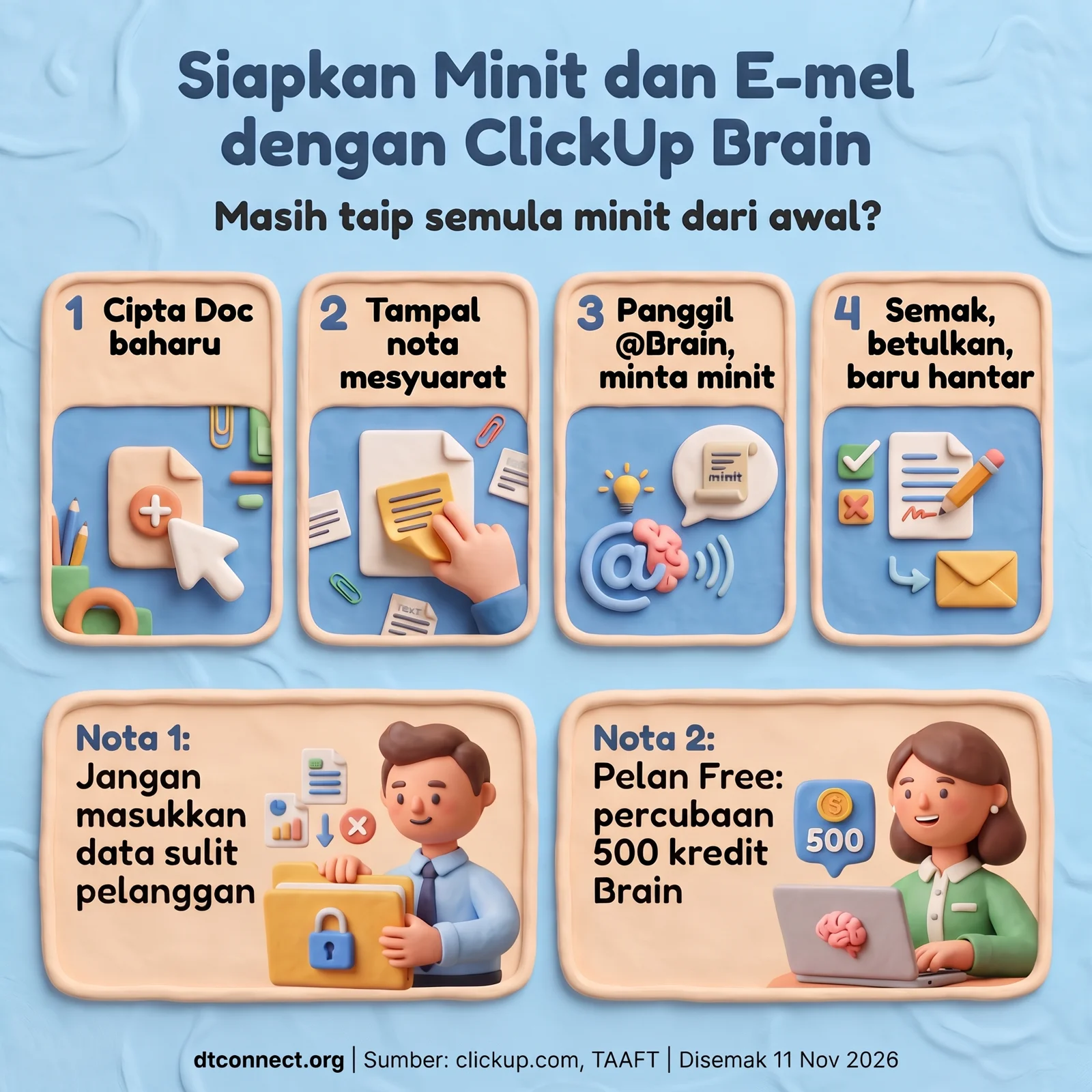
- Daftar akaun ClickUp pada pelan Free Forever, kemudian cipta Doc baharu.
- Tampal nota mesyuarat anda ke dalam Doc itu.
- Taip @Brain dan minta ia menyusun minit mesyuarat beserta senarai tindakan susulan.
- Minta Brain mendraf e-mel ringkas kepada pasukan berdasarkan minit itu.
- Baca setiap ayat, betulkan yang salah, dan baru hantar.
Had dan perkara yang perlu diberi perhatian
AI percuma itu terhad. Pada pelan Free Forever, Brain hanya diberi sebagai percubaan sebanyak 500 kredit bagi setiap ruang kerja. Ia bukan AI percuma tanpa had. Apabila kredit habis, anda perlu menaik taraf pelan atau membeli kredit tambahan.
AI Notetaker bukan percuma. Jika anda mahu nota mesyuarat diambil secara automatik, ciri AI Notetaker disenaraikan pada pelan Max. Pada pelan percuma, anda perlu tampal nota sendiri.
Privasi data. ClickUp menyatakan ia melarang penyedia AI pihak ketiga daripada melatih model mereka dengan data anda. ClickUp juga menyatakan perbualan anda dengan Brain adalah peribadi, dan pentadbir tidak boleh melihatnya. Walaupun begitu, jangan masukkan data sulit pelanggan atau maklumat peribadi tanpa kebenaran majikan.
Ketepatan. AI boleh tersilap. Ia mungkin salah faham nota, tertinggal butiran atau menulis fakta yang tidak tepat. Semak setiap nama, tarikh dan angka sebelum minit atau e-mel dihantar.
Bahasa Melayu. Sokongan bahasa Melayu tidak dinyatakan di laman rasmi yang kami semak. Cuba dengan nota pendek dahulu dan lihat hasilnya.
Mata wang dan bil. Harga dipaparkan dengan simbol $ dan untuk bil tahunan sahaja. Semak jumlah sebenar sebelum melanggan.
Sesuai untuk siapa
ClickUp Brain sesuai untuk pekerja pejabat, kerani, setiausaha, pegawai pentadbiran dan ketua pasukan yang kerap menyediakan minit mesyuarat, laporan ringkas dan e-mel susulan. Ia lebih berguna jika pasukan anda sudah menggunakan ClickUp untuk mengurus tugasan, kerana Brain bekerja di dalam ruang kerja yang sama.
Jika kerja anda melibatkan maklumat sulit, dapatkan kebenaran pihak IT atau pengurusan dahulu.
Kesimpulan
ClickUp Brain boleh membantu anda mengubah nota mesyuarat yang bertaburan menjadi minit, ringkasan dan draf e-mel dengan lebih pantas, terus di dalam ClickUp. Anda boleh mula dengan pelan Free Forever tanpa kad kredit, tetapi ingat kredit percubaan Brain hanya 500. Dua perkara penting: jangan masukkan data sulit tanpa kebenaran, dan semak setiap fakta sebelum hantar.
Sumber
- ClickUp, ClickUp Brain: clickup.com
- ClickUp, Pricing: clickup.com
- There’s An AI For That, ClickUp: theresanaiforthat.com
Artikel ini bebas dan tidak ditaja. Ciri dan harga disemak pada 11 November 2026 dan mungkin berubah.
Read this article in English
Your boss asks for meeting minutes, a short report and a follow-up email before the afternoon. Meanwhile, your meeting notes are scattered in several places.
Many people copy those notes, then retype everything from scratch. This work is tiring and slow. Important points are also easy to miss, especially follow-up actions that teammates need to take.
ClickUp Brain is an AI (artificial intelligence) assistant inside ClickUp that can help you draft emails, check language and revise documents. In this article we explain what it does, how much it costs, how to get started and what to watch out for.
What it does
ClickUp is a work management app, and ClickUp Brain is the AI assistant built into it. The official ClickUp page lists several Brain skills, including “Write copy”, “Draft emails”, “Create briefs”, “Proofread content” and “Revise documents”.
Brain can also “Build decks”, that is, build slide decks. Besides decks, it can build artifacts (finished pieces of work) such as dashboards or trackers based on a description you type.
For office workers, the idea is simple. You paste your notes, then ask Brain to arrange them into minutes, a summary or an email draft. You do not have to start from a blank page.
Key features
- Call it with @Brain: Brain can be called anywhere in ClickUp by typing @Brain.
- Writing help: Writing copy, drafting emails, creating briefs, proofreading and revising documents.
- Build decks and artifacts: Building slide decks, dashboards or trackers from a description.
- Deep Search: In-depth search across your workspace, connected apps and the web.
- Choice of AI models: You can choose models such as Claude, GPT and Gemini.
- AI Notetaker: An automatic meeting note-taker. This feature is listed on the Max plan, not the free plan.
Pricing
The ClickUp pricing page shows prices with the $ symbol only, and only for annual billing:
- Free Forever: $0. No credit card required. Includes a ClickUp Brain trial of 500 credits per workspace, and MCP calls (Model Context Protocol, a way for other AI tools to connect to ClickUp) are limited to 100 a day.
- Core: $9 per person a month, billed annually.
- Business: $17 per person a month, billed annually.
- Max: $100 per person a month, billed annually.
- Enterprise: Custom pricing. Contact the sales team.
- Extra credits: $10 for 10K (10,000) credits.
Monthly billing prices were not shown in the information we checked. A third-party AI tool directory lists prices from $7 a month, but we follow the official site.
Prices were checked on 11 November 2026 and may change.
Getting started
- Sign up for a ClickUp account on the Free Forever plan, then create a new Doc.
- Paste your meeting notes into that Doc.
- Type @Brain and ask it to arrange the meeting minutes with a list of follow-up actions.
- Ask Brain to draft a short email to the team based on those minutes.
- Read every sentence, correct anything wrong, and only then send it.
Limits and things to watch
The free AI is limited. On the Free Forever plan, Brain is only given as a trial of 500 credits per workspace. It is not unlimited free AI. When the credits run out, you need to upgrade your plan or buy extra credits.
AI Notetaker is not free. If you want meeting notes taken automatically, the AI Notetaker feature is listed on the Max plan. On the free plan, you need to paste your own notes.
Data privacy. ClickUp states that it forbids third-party AI providers from training their models on your data. ClickUp also states that your conversations with Brain are private and that admins cannot view them. Even so, do not enter confidential customer data or personal information without your employer’s permission.
Accuracy. AI can make mistakes. It may misread your notes, leave out details or write facts that are not accurate. Check every name, date and number before the minutes or email are sent.
Malay language. Support for Malay is not stated on the official pages we checked. Try a short note first and see the result.
Currency and billing. Prices are shown with the $ symbol and for annual billing only. Check the actual amount before subscribing.
Who it is for
ClickUp Brain suits office workers, clerks, secretaries, administrative officers and team leaders who often prepare meeting minutes, short reports and follow-up emails. It is more useful if your team already uses ClickUp to manage tasks, because Brain works inside the same workspace.
If your work involves confidential information, get permission from IT or management first.
Conclusion
ClickUp Brain can help you turn scattered meeting notes into minutes, summaries and email drafts more quickly, right inside ClickUp. You can start with the Free Forever plan without a credit card, but remember the Brain trial is only 500 credits. Two important things: do not enter confidential data without permission, and check every fact before sending.
Sources
- ClickUp, ClickUp Brain: clickup.com
- ClickUp, Pricing: clickup.com
- There’s An AI For That, ClickUp: theresanaiforthat.com
This article is independent and not sponsored. Features and prices were checked on 11 November 2026 and may change.