 DIMENSI
Guna ChatGPT untuk Kerja? Semak Tetapan Kawalan Data Dahulu
“Boleh ke saya muat naik dokumen pejabat dalam ChatGPT?” Soalan ini kerap ditanya oleh pekerja di Malaysia. Di banyak tempat kerja, belum ada dasar AI yang jelas. Akibatnya, ramai pekerja menggunakan AI secara senyap, tanpa panduan dan tanpa kebenaran rasmi. Keadaan ini kadang-kadang dipanggil “shadow AI” (penggunaan AI tanpa pengetahuan organisasi).
Cara yang salah ialah menampal maklumat kerja ke dalam ChatGPT tanpa pernah membuka tetapan data. Artikel ini menerangkan tetapan Data controls (kawalan data) dalam ChatGPT, apa yang ia lindungi, dan apa yang ia tidak lindungi.
Apa fungsinya
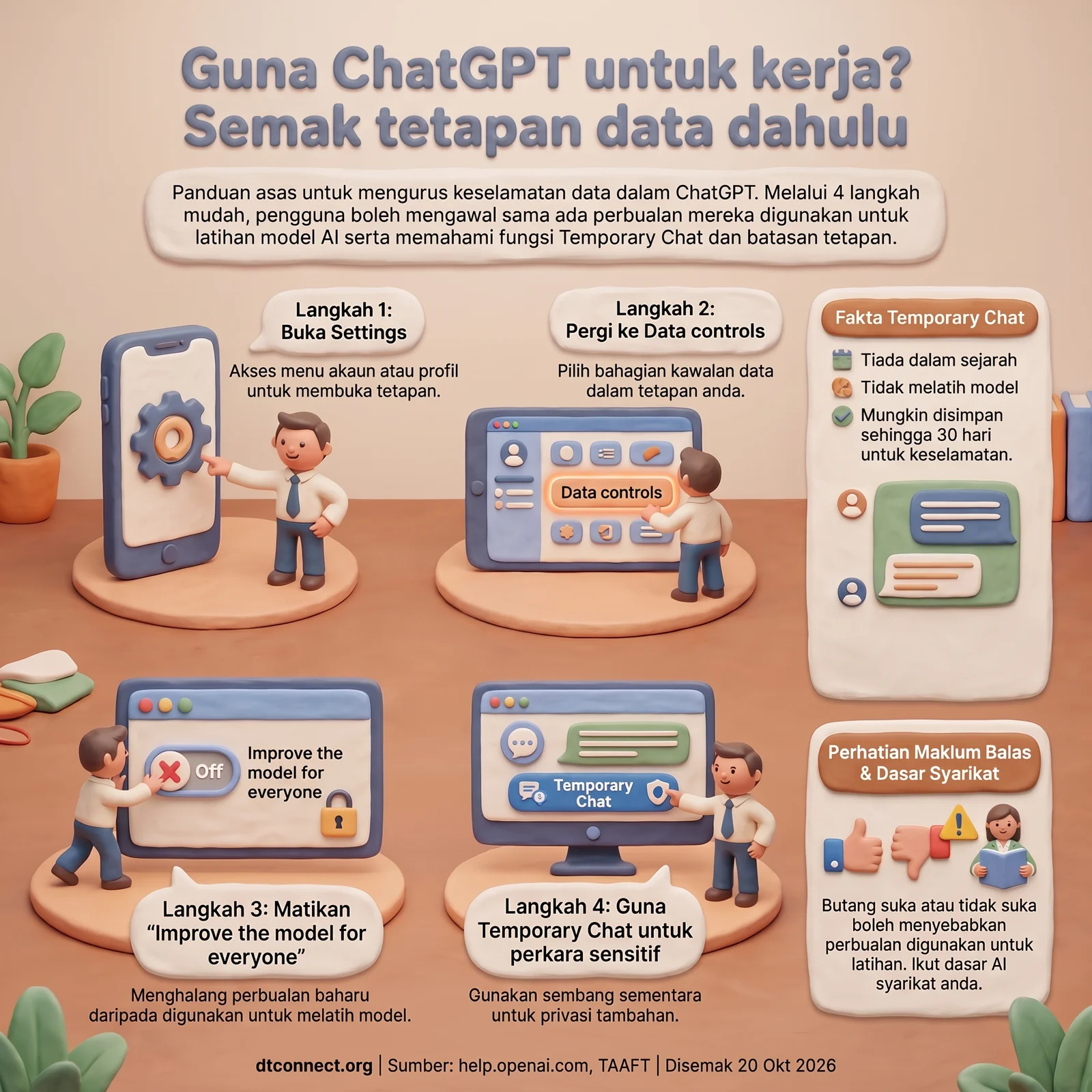
Data controls ialah sekumpulan tetapan dalam ChatGPT yang menentukan bagaimana perbualan anda digunakan. Tetapan paling penting ialah “Improve the model for everyone”. Menurut pusat bantuan OpenAI, jika tetapan ini dimatikan, perbualan baharu tidak digunakan untuk melatih model OpenAI. Perbualan itu masih muncul dalam sejarah sembang anda seperti biasa.
Selain itu, ada pilihan Temporary Chat (sembang sementara). Sembang jenis ini tidak muncul dalam sejarah, tidak mencipta atau mengemas kini memori, dan tidak digunakan untuk menambah baik model.
Ciri utama
- Tetapan latihan model. Matikan “Improve the model for everyone” supaya perbualan baharu tidak digunakan untuk latihan. Bagi pengguna yang tidak log masuk, pilihan ini disimpan dalam pelayar itu sahaja.
- Temporary Chat. Sesuai untuk soalan yang lebih sensitif. Ia tidak masuk sejarah dan tidak digunakan untuk melatih model.
- Eksport data. Pengguna Free, Go, Plus dan Pro yang log masuk boleh meminta salinan data mereka melalui tetapan ChatGPT atau Privacy Portal.
- Ruang kerja organisasi. Menurut OpenAI, ruang kerja Business, Enterprise, Edu dan Healthcare secara lalai tidak menggunakan kandungan untuk latihan.
- Memori berasingan. Memori dan latihan model ialah dua tetapan berbeza. Mematikan satu tidak mematikan yang lain.
Harga
Tetapan Data controls tersedia dalam ChatGPT, termasuk untuk pengguna pelan Free. Laman harga rasmi menyenaraikan pelan Free, Go, Plus, Pro, Business dan Enterprise. Semasa semakan kami, angka harga tidak dipaparkan pada laman tersebut, jadi kami tidak menyatakan harga di sini. Direktori There’s An AI For That (TAAFT) menyenaraikan ChatGPT sebagai Freemium. Harga disemak pada 20 Oktober 2026 dan mungkin berubah.
Cara bermula
- Di web, buka menu akaun dan pilih Settings. Di telefon (iOS atau Android), buka bar sisi dan pilih ikon profil, kemudian Settings.
- Pergi ke Data controls.
- Matikan “Improve the model for everyone”, kemudian klik Done.
- Untuk perkara yang lebih sensitif, mulakan Temporary Chat.
- Sebelum menampal apa-apa maklumat kerja, tanya diri anda: adakah organisasi saya membenarkan data ini dikongsi?
Had dan perkara yang perlu diberi perhatian
- Temporary Chat masih disimpan seketika. OpenAI menyatakan sembang sementara mungkin disimpan sehingga 30 hari untuk tujuan keselamatan.
- Butang suka atau tidak suka. Jika anda memberi maklum balas dengan butang suka atau tidak suka, seluruh perbualan berkaitan boleh digunakan untuk latihan, walaupun anda telah memilih untuk tidak menyertai.
- Tidak memadam sejarah. Mematikan latihan tidak memadam atau menyembunyikan sembang lama. Mengarkib sembang juga tidak mengubah sama ada ia layak digunakan untuk latihan.
- Bukan pengganti dasar syarikat. Tetapan ini tidak menjadikan semua data sesuai dikongsi. Data sulit, data peribadi pelanggan dan dokumen terhad tetap perlu mengikut dasar organisasi anda.
Sesuai untuk siapa
Panduan ini sesuai untuk pekerja yang sudah menggunakan akaun ChatGPT peribadi untuk tugas kerja, serta penyelia, pegawai sumber manusia dan pegawai IT yang sedang menyediakan garis panduan AI untuk pasukan mereka.
Kesimpulan
Semakan tetapan ini hanya mengambil masa beberapa minit, tetapi ramai pengguna tidak pernah membukanya. Buka Data controls hari ini, matikan “Improve the model for everyone” jika anda tidak mahu perbualan baharu digunakan untuk latihan, dan guna Temporary Chat untuk perkara yang lebih sensitif. Paling penting, tanya organisasi anda data apa yang dibenarkan.
Sumber
- OpenAI Help Center, Data controls FAQ: https://help.openai.com/en/articles/8983077
- Laman harga rasmi ChatGPT: https://chatgpt.com/pricing
- Senarai ChatGPT di There’s An AI For That: https://theresanaiforthat.com/ai/chatgpt/
Artikel ini bebas dan tidak ditaja. Ciri dan harga disemak pada 20 Oktober 2026 dan mungkin berubah.
Read this article in English
Using ChatGPT for Work? Check Your Data Controls First
“Can I upload office documents into ChatGPT?” Workers in Malaysia ask this often. Many workplaces still have no clear AI policy. As a result, many people use AI quietly, without guidance or official approval. This is sometimes called “shadow AI”.
The wrong approach is to paste work information into ChatGPT without ever opening the data settings. This article explains ChatGPT’s Data controls, what they protect and what they do not.
What it does
Data controls are a group of ChatGPT settings that decide how your conversations are used. The most important one is “Improve the model for everyone”. According to the OpenAI Help Center, when this setting is off, new conversations are not used to train OpenAI models. They still appear in your chat history as usual.
There is also Temporary Chat. Temporary chats do not appear in history, do not create or update memories and are not used to improve models.
Key features
- Model training setting. Turn off “Improve the model for everyone” so new conversations are not used for training. For signed-out users, the choice is saved in that browser only.
- Temporary Chat. Useful for more sensitive questions. It stays out of history and is not used to train models.
- Data export. Signed-in Free, Go, Plus and Pro users can request a copy of their data from ChatGPT settings or the Privacy Portal.
- Organisation workspaces. According to OpenAI, Business, Enterprise, Edu and Healthcare workspaces do not use content for training by default.
- Separate memory. Memory and model training are separate settings. Turning one off does not turn off the other.
Pricing
Data controls are available in ChatGPT, including on the Free plan. The official pricing page lists Free, Go, Plus, Pro, Business and Enterprise plans. When we checked, the page did not display price figures, so we do not state prices here. There’s An AI For That (TAAFT) lists ChatGPT as Freemium. Pricing was checked on 20 October 2026 and may change.
How to get started
- On the web, open the account menu and choose Settings. On a phone (iOS or Android), open the sidebar, select your profile icon, then Settings.
- Go to Data controls.
- Turn off “Improve the model for everyone”, then click Done.
- For more sensitive topics, start a Temporary Chat.
- Before pasting any work information, ask yourself: does my organisation allow this data to be shared?
Limitations and things to watch
- Temporary chats are still kept for a while. OpenAI says temporary chats may be retained for up to 30 days for safety purposes.
- Thumbs up and down. If you give feedback with thumbs up or down, the entire related conversation can be used for training, even if you opted out.
- History is not deleted. Turning off training does not delete or hide old chats. Archiving a chat does not change its training eligibility either.
- Not a replacement for company policy. These settings do not make all data safe to share. Confidential data, customer personal data and restricted documents must still follow your organisation’s policy.
Who it is for
This guide suits workers who already use a personal ChatGPT account for work tasks, and supervisors, HR officers and IT officers who are preparing AI guidelines for their teams.
Verdict
Checking these settings takes only a few minutes, yet many users never open them. Open Data controls today, turn off “Improve the model for everyone” if you do not want new conversations used for training, and use Temporary Chat for more sensitive topics. Most importantly, ask your organisation which data is allowed.
Sources
- OpenAI Help Center, Data controls FAQ: https://help.openai.com/en/articles/8983077
- ChatGPT official pricing page: https://chatgpt.com/pricing
- ChatGPT on There’s An AI For That: https://theresanaiforthat.com/ai/chatgpt/
This article is independent and not sponsored. Features and prices were checked on 20 October 2026 and may change.