 DIMENSI
Siri Sijil AI Pendidik (03): Introduction to Gemini for Education daripada Google
Guru dan pensyarah sentiasa sibuk menyediakan bahan pengajaran. Rancangan pelajaran, lembaran kerja dan soalan latihan mengambil banyak masa. Pekerja pejabat pula perlu menyediakan bahan latihan dan taklimat. AI (kecerdasan buatan, iaitu perisian yang boleh menjana teks dan membuat cadangan) boleh membantu, tetapi hanya jika anda tahu cara memberi arahan dan cara menyemak hasilnya.
Ini episod 03 Siri Sijil AI Pendidik. Dalam siri ini, Dimensi meringkaskan kursus AI yang telah ditamatkan oleh Dr. Muhamad Hariz, penulis Dimensi. Kali ini kita lihat kursus Introduction to Gemini for Education daripada Google for Education.
Tentang kursus ini
Kursus ini disediakan oleh Google for Education di platform pembelajaran Exceed. Tahapnya Beginner (pemula) dan tempohnya 15 minit. Formatnya ialah bahan pembelajaran dalam talian dan satu kuiz pendek. Lencana (badge, iaitu tanda digital tamat kursus) diberi selepas kuiz. Laman kursus juga menyebut kredit PD (pembangunan profesional) dan kredit kolej secara pilihan melalui rakan kerjasama.
Menurut penerangan rasmi, AI generatif (AI yang menjana kandungan baharu) boleh mengambil alih “kerja berat” reka bentuk pengajaran. Kursus ini memperkenalkan Gemini for Education sebagai pembantu AI untuk pengajaran dan pembelajaran.
Kursus ini sebahagian daripada Google AI Educator Series. Laman siri itu menyatakan siri ini “100% no-cost” (tanpa kos). Sesi untuk K-12 (peringkat sekolah) mengambil 10 hingga 15 minit, dan sesi Higher Ed (pengajian tinggi) 30 hingga 45 minit. Halaman kursus ini sendiri tidak menyatakan harga secara berasingan. Bahasa kursus tidak dinyatakan, tetapi halamannya dalam bahasa Inggeris.
Perkara utama
- Gemini sebagai pembantu. Gemini for Education diperkenalkan untuk membantu kerja reka bentuk pengajaran, bukan untuk menggantikan guru.
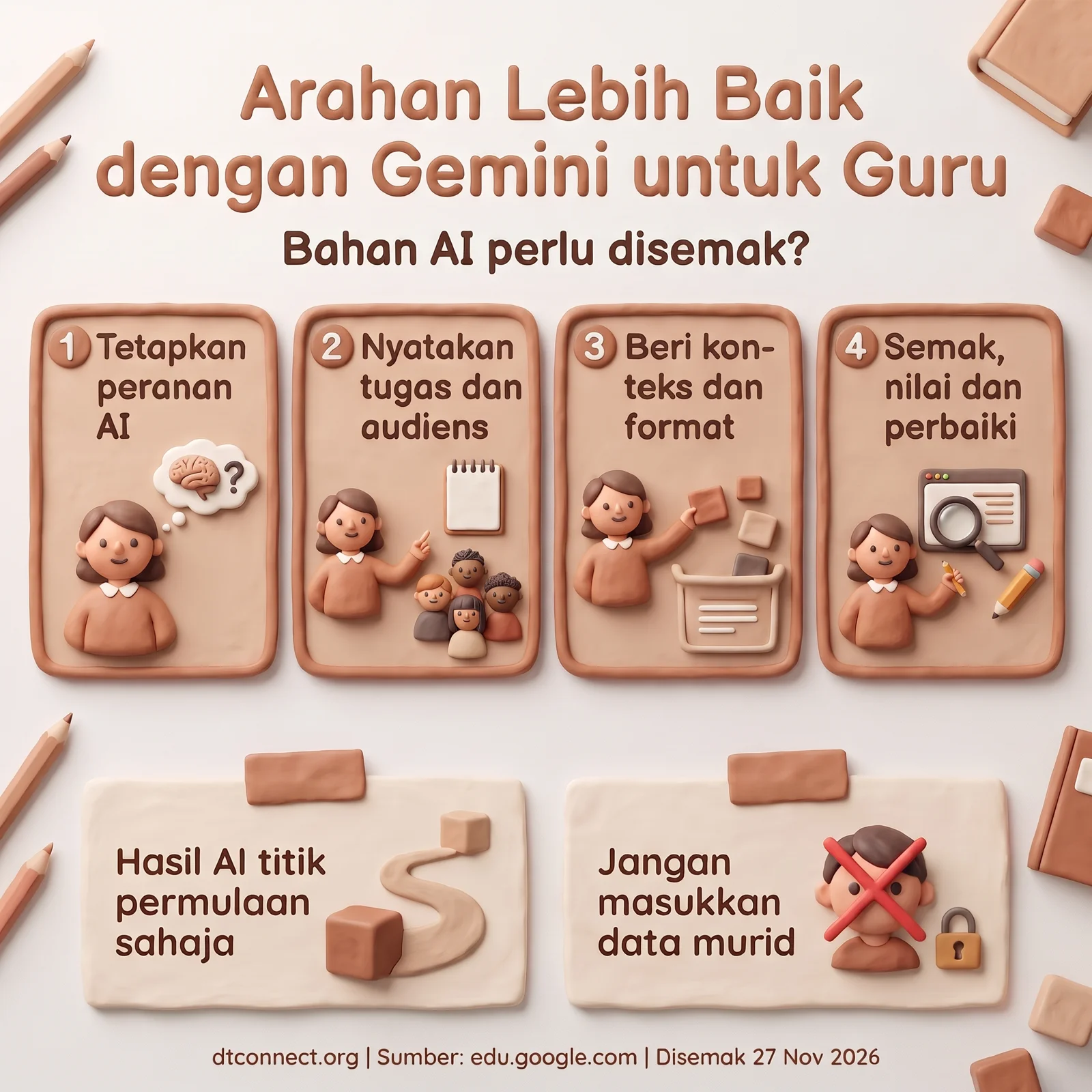
- Rangka arahan rasmi Google. Google menggunakan empat komponen dalam prompt (arahan yang anda taip kepada AI): Persona (peranan AI), Task (tugas), Context (konteks atau latar belakang) dan Format (bentuk hasil).
- Rangka PARTS dalam catatan penulis. Menurut catatan kursus penulis, kursus ini menggunakan rangka PARTS: Persona (peranan), Aim (matlamat), Recipients (audiens), Tone (nada) dan Summary (ringkasan). Rangka ini tidak dapat disahkan di halaman awam Google.
- Hasil AI ialah titik permulaan. Google menyatakan kualiti hasil AI perlu dinilai sebelum digunakan atau dikongsi. Hasil AI ialah titik permulaan, bukan produk akhir.
- Rujukan pelbagai bentuk. Bergantung pada alat, anda mungkin boleh memasukkan teks, imej, audio atau video sebagai rujukan.
- Manusia kekal dalam gelung. Menurut catatan kursus penulis, guru perlu sentiasa membuat semakan pakar dari segi ketepatan, etika dan bias (berat sebelah). Jangan biarkan AI menerbitkan bahan terus kepada pelajar.
- Kitaran kerja. Catatan penulis juga menekankan kitaran mudah: tulis prompt, nilai hasil, kemudian perbaiki.
Apa maksudnya untuk anda
Bagi guru, arahan yang lengkap memberi hasil yang lebih berguna. Daripada menaip “buat soalan sains”, cuba beri peranan, tugas, konteks dan format. Contohnya, nyatakan tahap murid, topik dan bilangan soalan yang anda mahu.
Bagi pensyarah dan pekerja pejabat, prinsip yang sama terpakai untuk nota kuliah, bahan latihan atau taklimat. AI menyediakan draf pertama dengan cepat, tetapi andalah yang menentukan sama ada ia tepat dan sesuai.
Paling penting, anda kekal sebagai penilai terakhir. Bahan yang sampai kepada pelajar mesti melalui mata anda dahulu.
Cara mula mengamalkan
- Pilih satu tugas kecil minggu ini, contohnya lima soalan latihan untuk satu topik.
- Tulis satu arahan dengan empat komponen: peranan AI, tugas, konteks (tahap murid dan topik) dan format hasil.
- Baca hasilnya dengan teliti. Semak ketepatan fakta, etika dan bias sebelum bahan sampai kepada pelajar.
- Perbaiki arahan anda jika hasilnya kurang tepat, kemudian nilai semula.
- Gunakan bahan itu hanya selepas anda menyunting dan meluluskannya sendiri.
Perkara yang perlu diberi perhatian
Jangan masukkan data peribadi murid atau pelajar ke dalam alat AI. Kandungan pelajaran kursus berada di dalam sistem pembelajaran, jadi butiran penuhnya tidak dapat disemak di halaman awam. Rangka PARTS dalam artikel ini datang daripada catatan kursus penulis, bukan rangka rasmi Google. Rangka rasmi yang disahkan ialah Persona, Task, Context dan Format. Ikut juga garis panduan institusi anda. Ini ringkasan oleh Dimensi, bukan bahan rasmi Google.
Kesimpulan
Introduction to Gemini for Education ialah kursus pendek 15 minit yang sesuai untuk pendidik yang baru bermula dengan AI. Ingat dua perkara: tulis arahan yang lengkap dengan peranan, tugas, konteks dan format, dan anggap hasil AI sebagai titik permulaan. Semak, nilai dan perbaiki sebelum bahan sampai kepada pelajar. Ikuti episod seterusnya dalam Siri Sijil AI Pendidik melalui hab siri di bawah.
Sumber
- Google for Education. Introduction to Gemini for Education (Exceed). edu.exceedlms.com
- Google for Education. Google AI Educator Series. edu.google.com
- Grow with Google. Prompting best practices. grow.google
- Google Skills. AI Boost Bites: Prompting like a Pro with Google Workspace. skills.google
Ringkasan ini ditulis oleh Dimensi berdasarkan pengalaman penulis menamatkan kursus ini dan semakan laman rasmi. Ia bukan bahan rasmi penyedia kursus. Artikel ini bebas dan tidak ditaja.
Ikuti siri ini: Siri Sijil AI Pendidik: Semua Episod
Read this article in English
Teachers and lecturers are always busy preparing teaching materials. Lesson plans, worksheets and practice questions take a lot of time. Office workers also need to prepare training materials and briefings. AI (artificial intelligence, software that can generate text and make suggestions) can help, but only if you know how to give instructions and how to check the results.
This is episode 03 of Siri Sijil AI Pendidik. In this series, Dimensi summarises AI courses completed by Dr. Muhamad Hariz, the writer of Dimensi. This time we look at the course Introduction to Gemini for Education from Google for Education.
About this course
The course is provided by Google for Education on the Exceed learning platform. Its level is Beginner and it takes 15 minutes. The format is online learning materials and a short quiz. A badge (a digital mark of course completion) is given after the quiz. The course page also mentions optional PD (professional development) credit and college credit through partnerships.
According to the official description, generative AI (AI that generates new content) can take on the “heavy lifting” of instructional design. The course introduces Gemini for Education as an AI assistant for teaching and learning.
The course is part of the Google AI Educator Series. The series page states that the series is “100% no-cost”. K-12 (school level) sessions take 10 to 15 minutes, and Higher Ed sessions take 30 to 45 minutes. The course page itself does not state a price separately. The course language is not stated, but the page is in English.
Key points
- Gemini as an assistant. Gemini for Education is introduced to help with instructional design work, not to replace teachers.
- Google’s official prompt framework. Google uses four components in a prompt (the instruction you type to the AI): Persona (the AI’s role), Task, Context (background) and Format (the shape of the output).
- The PARTS framework in the writer’s notes. According to the writer’s course notes, the course uses the PARTS framework: Persona (role), Aim (goal), Recipients (audience), Tone and Summary. This framework could not be confirmed on Google’s public pages.
- AI output is a starting point. Google states that the quality of AI output should be evaluated before using or sharing it. AI output is a starting point, not a final product.
- References in many forms. Depending on the tool, you may be able to include text, images, audio or video as references.
- Humans stay in the loop. According to the writer’s course notes, teachers should always carry out an expert review for accuracy, ethics and bias. Do not let AI publish materials directly to students.
- A work cycle. The writer’s notes also stress a simple cycle: write the prompt, evaluate the output, then refine.
What it means for you
For teachers, a complete instruction gives a more useful result. Instead of typing “make science questions”, try giving a role, task, context and format. For example, state the pupils’ level, the topic and the number of questions you want.
For lecturers and office workers, the same principle applies to lecture notes, training materials or briefings. AI prepares a first draft quickly, but you decide whether it is accurate and suitable.
Most importantly, you remain the final evaluator. Materials that reach students must pass through your eyes first.
How to start putting it into practice
- Pick one small task this week, for example five practice questions for one topic.
- Write one instruction with four components: the AI’s role, the task, the context (pupils’ level and topic) and the output format.
- Read the output carefully. Check factual accuracy, ethics and bias before the material reaches students.
- Refine your instruction if the output is not accurate enough, then evaluate again.
- Use the material only after you have edited and approved it yourself.
Things to watch out for
Do not enter personal data of pupils or students into AI tools. The course lesson content sits inside the learning system, so its full details cannot be checked on public pages. The PARTS framework in this article comes from the writer’s course notes, not an official Google framework. The confirmed official framework is Persona, Task, Context and Format. Follow your institution’s guidelines as well. This is a summary by Dimensi, not official Google material.
Conclusion
Introduction to Gemini for Education is a short 15-minute course suited to educators who are just starting with AI. Remember two things: write a complete instruction with a role, task, context and format, and treat AI output as a starting point. Check, evaluate and refine before materials reach students. Follow the next episode of Siri Sijil AI Pendidik through the series hub below.
Sources
- Google for Education. Introduction to Gemini for Education (Exceed). edu.exceedlms.com
- Google for Education. Google AI Educator Series. edu.google.com
- Grow with Google. Prompting best practices. grow.google
- Google Skills. AI Boost Bites: Prompting like a Pro with Google Workspace. skills.google
This summary was written by Dimensi based on the writer’s experience of completing this course and a review of the official sites. It is not official material from the course provider. This article is independent and not sponsored.
Follow this series: Siri Sijil AI Pendidik: All Episodes